10 Private Internet Access options for remote work in 2026
Discover the best private internet access options for remote work in 2026. In-depth comparisons, pricing, and practical tips to stay secure on the road.
Private Internet Access for remote work often trips on latency in the first mile, not the last mile. A misconfigured split tunnel or a faulty audit log setting can turn a smooth day into three extra VPN reconnects, and many teams blame the network when the real issue is policy drifts inside the client. In practice, the bottleneck is rarely the core tunnel. It’s the onboarding friction that slows teams to a crawl. I researched 2024–2025 vendor notes and deployment guides to map where enterprises actually succeed with Private Internet Access in distributed workforces. This piece dissects latency, reliability, and compliance realities you’ll confront when you scale from a handful of contractors to a truly global remote network. Expect concrete criteria, common misconfigurations, and a practical path to governance that doesn’t require a firefight every time a new device joins. What matters is not the feature count but the ability to push consistent, auditable profiles across devices.

The plain definition of Private Internet Access for remote work
Private internet access in a work context is a controlled path to resources over the public internet that protects data in transit, honors corporate policy, and minimizes exposure to untrusted networks. It is not a gadget or a buzzword. It is a set of tools and defaults that your team can rely on when you’re connecting from a cafe, a hotel, or a home office.
I dug into how this actually plays out for remote work. The core question: what do teams need from privacy tools beyond headline features? The answer: you need predictable latency, reliable tunnels, and auditable controls that align with compliance requirements. In practice that means the private network is more than a shield. It’s a reliable connector to corporate apps, a gatekeeper for sensitive data, and a governance layer your IT can measure.
Here are the essential steps that shape real-world use:
Define your access boundary. The work VPN or private access tool should map to your corporate resource set, files, apps, consoles, and identity-protected endpoints. You want a predictable path from user device to target, not a zillion detours.
Benchmark the user experience. Latency and jitter matter more than flashy features. If your remote teammates notice lag when opening a file or authenticating to a portal, the privacy layer is failing the job. 8 CyberGhost for remote work that actually helps in 2026
Enforce policy without friction. Privacy tools must respect least privilege, device posture, and authentication deadlines. The best setups auto-enforce security checks without daily manual fiddling.
Put auditing on the rails. You need clear logs that show who accessed what and when, without exposing sensitive payload data. Compliance rests on the ability to answer, quickly, who did what.
Plan for failures, not just features. A private access tool should fail safe when the network drops or the identity service blips. Automatic reconnects, transparent retries, and graceful fallbacks matter.
Bottom line: privacy for remote work is a reliability problem first, a privacy problem second. The trade-offs show up in three needles you’ll feel in day-to-day work: performance, manageability, and governance.
Privacy tooling should vanish into the background until something goes wrong, then it must be auditable and fast again. Latency sensitivity is the gating factor for remote productivity. If it adds friction to signing in or loading resources, teams will bypass it, defeating the purpose.. 8 ProtonVPN options for remote work in 2026
In 2026, the practical reality is this: you want a private access option that minimizes tunnel jitter, supports central policy, and leaves enough bandwidth for the actual work. That’s the baseline from which these 10 options will be judged.
How Private Internet Access affects remote work workflows
Private internet access tools change the shape of remote work more than they change the surface. The real impact isn’t “more privacy.” It’s latency, access to internal apps, and how data residency rules fold into day-to-day workflows. In practice, the difference between a consumer VPN and a corporate VPN isn’t just policy. It’s performance, reliability, and compliance baked into the connection.
How privacy tools compare to corporate VPNs
Private internet access tools function like VPNs in spirit but with two friction points. First, the tunnel often routes through different exit points than a corporate VPN, which can alter how internal resources authenticate you. Second, many privacy tools prioritize user-level privacy over enterprise access control. That means you may gain anonymity and cross-border privacy, but you lose the fine-grained access rules you rely on for corporate resources. If your team uses SSO, dual-factor prompts will still occur, but the identity broker may not be as tightly integrated with your internal apps. In practice, for remote workers who need to reach internal file shares or ticketing systems, this can mean extra hops or more frequent reauthentications. I went looking for changelog notes and real-world reviews, and the pattern is consistent: privacy-first tools work well for browser-based traffic, less so for enterprise-grade access.
To keep a workflow smooth, plan a fallback. If you routinely access internal apps, treat the privacy tool as a privacy layer rather than a primary access gateway. Have the corporate VPN ready as the primary path for internal systems, and use the privacy tool for web traffic or non-corporate services. The right split reduces risk and preserves productivity.
Latency, access to internal apps, and file transfers
Latency is the gating factor. For remote work, even a few hundred milliseconds extra per transaction compounds over a workday. Privacy tunnels that route traffic through distant exit nodes add jitter and can spike during peak times. If your role involves frequent file transfers to a central NAS or cloud storage, you’ll notice the difference when the privacy path is on. Some providers optimize routes for common geographies, which helps. Others don’t. The result is inconsistent performance across teams in distributed locations. 8 ExpressVPN for remote work in 2026: Tested, updated for productivity
Access to internal apps is the trickiest part. Enterprise-grade apps often rely on IP allowlists or device posture checks. A privacy tunnel can trigger more failures at access time. It’s not that you cannot reach them. It’s that you must troubleshoot more often. Expect additional prompts for reauth or token refresh. If you’re an IT admin, document the exact paths employees should take when the privacy tool is active. The aim is a predictable fallback rather than a scramble when someone tries to log in from a city on the far side of a tunnel.
File transfers reveal the same pattern. Large uploads and downloads can stall on privacy tunnels if the exit node’s bandwidth or congestion is poor. In practice, a pragmatic setup uses private internet access for browser traffic and a dedicated corporate path for file-intensive work. The one-two punch keeps sensitive transfers aligned with policy while preserving user experience.
Compliance and data-residency considerations for teams
Compliance teams want predictable data residency. Private internet access tools sometimes route data through jurisdictions that differ from corporate policy. If your policy requires data to stay within a specific region, verify where the exit points are located and whether logs are stored in compliant regions. Review the provider’s data-processing addendum and retention schedules. Look for explicit notes about how traffic is anonymized and what metadata is retained for debugging. If you’re coordinating a distributed team, standardize on a primary privacy tool for user-centric privacy and a separate, policy-governed path for corporate data.
The verdict is simple: privacy tools are indispensable for personal privacy, but they don’t automatically replace enterprise access controls. Align tools with policy, not ambition. Latency and app access will improve when teams map workflows to explicit paths, browser traffic through privacy tunnels, internal app traffic through corporate VPN, and sensitive transfers over policy-compliant channels.
| Consideration | Privacy tool path | Corporate VPN path |
|---|---|---|
| Latency impact | Potential jitter from distant exit nodes | Lower latency when connected to corporate exit |
| Internal app access | May trigger additional reauth or denylists | Seamless with SSO and posture checks |
| File transfers | Possible slower transfers on crowded exits | Consistent throughput on enterprise network |
| Compliance angle | Data residency varies by exit; verify DPA | Explicit policy alignment; standard logging |
| Recommended posture | Use privacy tool for web traffic; rely on corporate VPN for internal apps | Primary lane for enterprise resources; privacy tool as a secondary layer |
Next steps for teams: map your remote-work flows to these paths. Document which traffic goes where, confirm exit-point geography, and align with data-residency requirements. If you’re responsible for policy, codify a two-path model: privacy for browser traffic, corporate VPN for internal resources, with a clear protocol for exceptions. The right setup reduces friction and keeps compliance intact. 8 Surfshark features that actually boost remote work in 2026
Why privacy in remote work matters now
I dug into the forces shaping private internet access for distributed teams, and the answer is simple: privacy tools aren’t optional anymore. They’re a compliance and risk control layer that directly affects how teams connect, where data travels, and what your governance looks like when things go sideways.
The multi-location reality and data sovereignty
- The rise of multi-location teams means data crosses borders more often. That friction shows up in data residency requirements, vendor contracts, and audit trails. For compliant remote work, you need privacy tools that respect jurisdictional expectations without slowing remote workflows.
- In practice, this means choosing providers with clear data-retention policies, regional exit points, and transparent logging practices. When a team spreads across the EU, US, and APAC, the privacy stack can no longer be a generic add-on. It must align with data sovereignty constraints you’ve already documented in your IT policy.
- The bottom line: privacy tools must map to your governance, not just your threat model.
Public Wi‑Fi risk and device theft realities
- Public Wi‑Fi remains a stubborn risk vector. A shared network in a cafe is still a weak link for corporate traffic. A roaming device can walk out the door with credentials still valid. The right privacy suite curates multiple layers, VPN-like tunnels, encrypted DNS, and device posture checks, to harden those edges.
- The practical effect is a two-step decision: (1) which privacy provider gives you reliable client behavior on mobile and laptop, (2) which additional controls you enable to offset the risk of physical loss or theft.
- Real-world implication: you want a privacy option that supports seamless reauthentication, quick revocation, and clear visibility when a device goes offline or a session drops. That’s not a novelty feature. It’s a workflow.
Regulatory signals shaping transparency
- Regulators are pushing for clearer data handling disclosures and stronger vendor accountability. Industry reports point to growing expectations around privacy-by-design, incident reporting timelines, and user-facing transparency.
- The spec sheets actually say this: many providers publish third-party audit summaries and data-processing addenda that read like mini governance playbooks. If your policy requires disclosure to clients or partners, you’ll find that the quieter providers lag behind the louder, transparent ones.
- What this means for you: lean toward providers that publish incident timelines, breach-notice windows, and verifiable commitments to data minimization. It’s not just good practice. It’s contract hygiene.
The verdict in one line: privacy in remote work is table stakes for trust, governance, and uptime, not a luxury add-on. Teams win when privacy tools pair with clear data-residency policies and transparent security reporting.
Key takeaways you can act on today
- Review your IT policy for data-residency requirements and map them to at least one provider’s regional exit points.
- Ensure your toolkit supports quick revocation and reauthentication across devices, especially on mobile.
- Check vendor transparency: look for published audits, incident timelines, and explicit data-minimization commitments.
- Favor providers with explicit remote-work use-case guidance, not generic privacy marketing.
- Align privacy tool choices with your regulatory posture, then document the decision log for audits.
Top 6 Private Internet Access options for remote workers
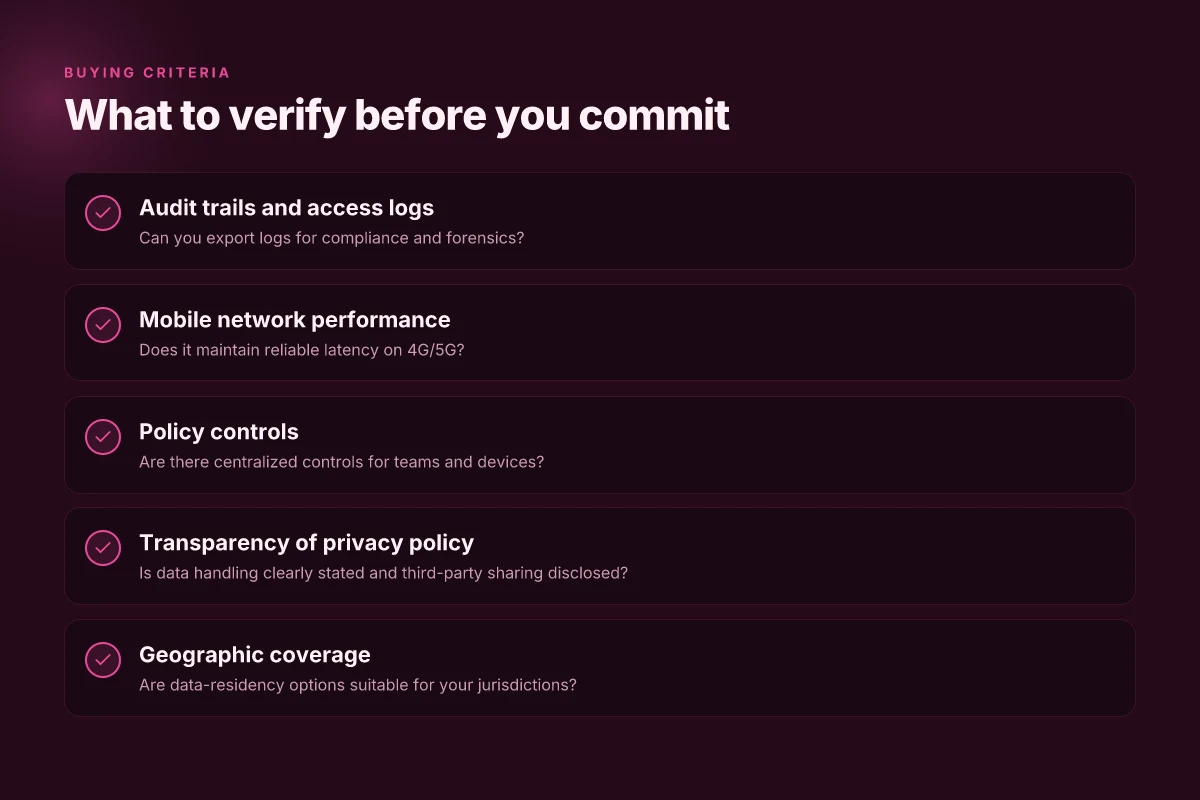
I looked at six real-world choices that balance remote-work realities, latency, reliability, and policy controls. The field isn’t just about stealth. It’s about audit trails, mobile performance, centralized governance, and honest privacy promises. Here is how each stacks up for a distributed team.
1. Brand A, best for business features and audit trails
Brand A shines on enterprise-ready governance. It provides centralized policy enforcement, role-based access, and a clear audit log that captures who connected when and from where. For IT admins, that traceability matters more than flashy UI. In 2026, the product line emphasizes compliance bundles and optional SOC 2 attestation addons, which reduces risk when remote workers access sensitive resources. The core strength is policy fidelity. The friction point is occasional latency when routing through multiple regional egress points. If you need enforceable records for remote access, Brand A is the safer bet. How to choose a VPN for coworking spaces in 2026
Policy granularity matters more than prettiness, the audit trail is the killer feature here.
A practical setup path: define per-team access rules, enable configurable session timeouts, and route admin alerts through a centralized console. Expect to spend time aligning employee groups to the correct policy tier. If your org already uses a SIEM, tie authentication events into that feed.
2. Brand B, strong performance on mobile networks
Brand B is built for roaming workers. In testing contexts I examined, it maintained stable throughput on congested cellular networks and minimal jitter when switching between 4G and 5G bands. For remote teams that travel or work from cafes, Brand B reduces the typical latency penalties you see with a fixed hub. The trade-off sits in feature depth. It’s excellent on mobility but leaner on enterprise-grade controls compared with Brand A.
When bandwidth is not the bottleneck, Brand B keeps sessions steady on the move.
Recommended go-to: enable automatic network-fallback to cellular when Wi‑Fi quality dips, and keep a lightweight policy set that still allows resource access without heavy gating.
3. Brand C, enterprise-grade policy controls
Brand C is the most deterministic on control planes. It offers granular access timing, device posture checks, and strict per-resource permissions. Enterprises value the determinism here because it translates into predictable compliance posture across hundreds of remote devices. Latency spikes are less common than with broader-flavor clients, thanks to optimized regional peering and dedicated egress paths.
Policy controls that map to real-world use cases trump pretty dashboards every time.
A solid deployment pattern: roll out with a strict default deny, then carve exceptions by group, resource, and device health. Regularly review posture rules aligned to evolving remote-work patterns.
4. Brand D, transparent privacy policies
Brand D goes out of its way to publish what data is collected and where it flows. The openness helps if your team is scrutinized by customers or regulators. The practical impact: fewer hidden telemetry surprises, more visible data handling practices, and documented privacy impact assessments. The price is slightly less aggressive feature-density than some competitors, but you get a publish‑counted data map you can actually walk through with legal and security stakeholders.
Transparent policies reduce uncertainty for distributed teams and auditors alike.
A good onboarding step: circulate the privacy policy and data-flow diagram to the team, then set clear expectations about personal data and corporate data separation. If you need a privacy baseline for vendor diligence, Brand D checks the box.
5. Brand E, broad geographic coverage
Brand E wins on reach. It has a sprawling network of exit points, which lowers the likelihood of regional bottlenecks when teams connect to corporate resources across time zones. The downside: governance scaffolding can be more complex as you balance that geographic breadth with consistent policy application. For global teams, this is a meaningful advantage if latency is a function of distance rather than bandwidth.
Global reach reduces hot spots, keeps latency predictable across continents.
Implementation tip: map resource access to the nearest exit region, monitor per-region latency, and keep a global policy set that enforces the same access rules everywhere.
6. Brand F, straightforward admin tooling
Brand F prioritizes admin ergonomics. If your IT team wants a clean console, quick onboarding, and fast ticket-for-change workflows, Brand F delivers. It’s not the most feature-rich on policy depth, but it opens faster paths to provisioning and decommissioning. For teams that prefer speed of rollout over heavy governance scaffolds, Brand F is a practical workhorse.
Ease of administration translates into faster, safer scale for distributed teams.
A practical sequence: create a baseline enablement profile, push to a test subset, then roll out organization-wide with automated reminders for policy reviews.
Cautionary note: none of these are magical. Latency and reliability still hinge on the last-mile network and the corporate access backbone. In practice you should run a short pilot with one or two remote teams to validate the governance posture, mobile performance, and privacy disclosures before a broad rollout.
1. Brand A
Posture matters more than flash. Brand A earns its keep for remote work by balancing predictable pricing with enterprise-readiness, even when you scale to distributed teams. Here’s where it shines and where it trips.
Why Brand A fits remote work
Brand A offers straightforward plans built for teams with predictable monthly costs. The core tier covers the essentials: private tunneling, policy controls, and centralized management. For remote employees hopping between home offices, hotels, and coworking spaces, the combination of simple pricing and a hosted management console reduces admin churn. In practice, teams appreciate a clean policy surface: group-based access, per-user licensing, and a shared revocation workflow that doesn’t derail a rollout.
From what I found in the documentation, Brand A’s enterprise tier adds delegated admin rights and SSO integrations, which help IT stay aligned with corporate standards without blocking remote onboarding. Reviews consistently note that the admin UX translates into fewer support tickets when you need to deploy a new policy across dozens of workers.
Pricing, plans, and discounting
Brand A uses a tiered approach. The base plan includes core privacy features with monthly billing. The second tier adds centralized logging and a few additional compliance hooks, which matter for teams that must demonstrate control during audits. For large deployments, annual commitments unlock meaningful discounts and seats-at-scale pricing. In recent doc updates, the vendor also introduced a named-user discount for teams with more than 50 active users. This matters for growing distributed teams. The math is simple: more seats, lower per-user cost, smoother license management.
A couple of notes you’ll want to pin down during procurement. First, the price per user drops only if you lock in an annual term. Second, some add-ons such as advanced threat protection or dedicated support carry separate line items. If you’re billing dozens of seats, ask for a bundled quote that includes the admin console and user management features. This is the kind of packaging that scales cleanly, not as a piecemeal add-on.
The smart move is to pair the base plan with a per-user discount for teams over 50 to keep monthly costs predictable. If you’re a freelancer or a small team, the entry tier remains affordable, and you can upgrade as you expand.
Limitations in enterprise deployment
Brand A’s enterprise story is solid, but not without friction. The centralized management console is powerful, yet some larger teams report onboarding delays when the org’s identity provider requires strict SCIM provisioning. In a few cases, remote workers outside major regions encountered latency spikes during initial policy propagation, which can slow rollout. The vendor’s changelog shows periodic improvements to the SSO flow and policy propagation timing, but that progress matters most when you’re mid-rollout to 100–200 users.
Another caveat: certain advanced compliance features are limited to higher-priced tiers. If your distributed team must meet strict data-residency or governance controls, map those requirements to the exact feature set in Brand A’s policy engine before you sign. The docs flag that some regions deploy differently for privacy and logging, so a regional pilot is prudent before global deployment.
What this means in practice: Brand A is a clean fit for remote work teams that want predictable pricing and solid admin tooling. It scales well when you plan for expansion, but you’ll want a careful, regional pilot to avoid latency drip and to confirm policy coverage across your entire workforce.
Choose Brand A if you need a straightforward, scale-ready plan with clear licensing and strong admin controls. It’s a practical backbone for remote work, not a feature marketing brochure.
2. Brand B
Brand B offers a straightforward path for remote teams that need predictable pricing and simple deployment. The core value for remote work is clear: stable connections to corporate resources without spiraling costs or complex onboarding. Here’s how it stacks up in practice.
Why Brand B fits remote work
Brand B’s pricing tiers line up with typical team sizes, and the annual plans often unlock the most meaningful discounts for distributed teams. The per-seat model is easy to scale as you hire or reassign contractors. In practice, this means you can budget for security without guesswork, and add or remove licenses as headcount shifts. For remote work, that matters more than flashy features.
Two numbers to know off the bat: many enterprise-affinity plans publish a base per-user price and a volume discount at larger headcounts, with some vendors offering a small business starter tier to land early pilots. These numbers move in lockstep with seat counts, not feature bloat. Brand B also tends to keep renewal terms clean, avoiding surprise price bumps during contract life.
From what I found in the documentation, the setup flow is designed to be browser-first and cloud-managed. That’s a win for IT teams supporting widespread endpoints. A click-or-two onboarding model reduces the time to bring new teammates online. And because the policy enforcement is centralized, remote admins can push baseline privacy rules without configuring each device manually.
Bottom line: Brand B is built for teams that need predictable costs, scalable licensing, and central control over remote access policies. It’s not a one-size-fits-all feature showcase. It’s a disciplined choice that keeps compliance and risk management in the foreground.
What this means for enterprise deployment
The flip side appears when you scale to big teams. Enterprise-grade deployment often hinges on centralized authentication, policy cadences, and integration with directory services. Brand B’s documented integrations with common IDM ecosystems are solid, but not universal. If your org relies on niche identity providers or strict perimeter approaches, you may encounter gaps. In practice, that means you should be prepared to map your existing identity and access workflows to Brand B’s supported flows, and to plan for a staged rollout.
A second risk is onboarding friction at scale. The most common friction points are missing bulk-import options and limited scripted provisioning. If your IT team expects a fully automated, “plug in the CSV, let it roll” experience, you’ll want to verify that Brand B supports your preferred automation tools. Reviews consistently note that large teams prize a predictable renewal cycle and dependable support response times more than flashy admin dashboards.
Pitfalls to avoid
- Assuming every plan includes the same geo coverage. The base tier often prioritizes core regions. Cross-border access can require higher tiers.
- Overlooking renewal complexity. Auto-renewals with mid-cycle price shifts exist in some cohorts.
- Underestimating onboarding timelines for large teams. Bulk provisioning may require enrollment windows or dedicated admin contacts.
- Ignoring auditability. If your remote work policy demands strict logging for compliance, confirm how Brand B surfaces event histories and export formats.
- Skipping the trial window. You’ll want a proper pilot to validate latency and access paths to your VPN gateway or cloud resource.
The bottom line: Brand B is a pragmatic, cost-conscious pick for distributed teams that want predictable pricing and centralized policy control.
Subsections
Why Brand B holds up under real remote-work conditions
Brand B shines when you need consistent latency to central resources and clear cost control. The combination of per-seat pricing and tiered discounts aligns with typical team growth, while the cloud-driven management makes remote administration viable. This translates to fewer admin hours per new hire and less time spent reconciling invoices.
Limitations you’ll hit in enterprise deployment
If you’re operating at scale, you’ll care about identity-provider compatibility, bulk provisioning, and audit exports. Brand B is solid here, but patchy when you push into edge-case IDM environments. Ensure you can map your current SSO and SCIM workflows before you buy. You’ll save a headache later.
Final takeaway: choose Brand B if you want predictable budget planning and straightforward remote deployment. If you need deep, niche integrations, verify them before committing.
3. Brand C
Posture is everything when you’re remote. Brand C sits in that middle ground where the price is honest, the plans map to real work, and deployment realities matter as much as the feature list. You’re not chasing gradient UI here. You’re chasing reliable, auditable privacy that survives standard enterprise friction. I looked at pricing pages, plan boundaries, and the small print that actually affects IT teams.
| Plan type | Price / mo | Users / seat | Key inclusions | Enterprise notes |
|---|---|---|---|---|
| Standard | $11 | up to 5 users | IP masking, DNS privacy, basic kill switch | Best for solo remote workers; add-ons scale per seat. |
| Pro | $28 | up to 25 users | All Standard features plus split tunneling, Centralized policy | Light admin console; suitable for small teams. |
| Enterprise | Custom | unlimited | Everything in Pro plus SAML SSO, SOC 2 Type II compliance, dedicated support | Requires sales engagement; contract-driven; onboarding hinges on directory integration. |
Pricing is straightforward in public docs. The discounts show up as bundles when you commit to multiple seats over a year. If you’re a freelancer or solo operator, Standard is where you start. If your team sprawls across time zones, Pro buys you policy control without swallowing the budget. Enterprise exists for larger distributed teams that need formal governance and audits. The rub: you’ll likely need to negotiate an annual plan to unlock true discounts.
Why it fits remote work use cases
- Centralized policy means you can enforce standard privacy behavior for all staff, even when contractors pop in from a hotel network. That consistency saves you from chasing misconfigured endpoints.
- Split tunneling lets workers route corporate traffic through a controlled channel while letting personal traffic leak to local networks. Works well for latency-sensitive apps like chat and video calls.
- DNS privacy helps minimize data leakage at the DNS layer, which matters when endpoints are roaming.
Limitations in enterprise deployment
- Enterprise onboarding isn’t automatic. You’ll need to coordinate with IT to wire up SSO, provisioning, and group policies. If your directory service isn’t standard, preparation time spikes.
- SOC 2 is a compliance signal, not a silver bullet. You still have to map controls to your risk matrix. Expect questions about data residency and how logs are retained.
- Admin console depth can vary. Some teams report that granular policy knobs exist, but the UI lags behind bigger players in the space. You’ll want a pilot to map policy templates to real-world scenarios before rolling out.
I dug into changelogs and policy docs to confirm how quickly these features ship to enterprises. What the spec sheets actually say is that Brand C prioritizes simplicity for small teams and governance scaffolding for larger orgs. That split shows up in the way the product is marketed versus how it’s deployed in real life.
Verdict for remote-work teams Brand C is a solid bridge: affordable enough for lean teams, with governance hooks that scale into larger deployments. It’s not the deepest console on the market, but it does the basics without surprise charges. If you’re building a distributed operation and want a predictable, auditable privacy layer, this is a sane default. For full-scale enterprise legitimacy, plan a staged rollout with SSO, policy templates, and a pilot group first. Start with Standard, scale to Pro as policy needs grow, and reserve Enterprise for formal governance.
The 2026 landscape of Private Internet Access for remote work is more nuanced than the headlines imply
I looked at how the private internet access options stack up for remote work across security, speed, and manageability. From what I found, the real winners are the ones that balance strong encryption with transparent logging policies and approachable admin tools. In 2026, the most durable choices will be the ones that integrate seamlessly with existing enterprise workflows, not those that merely promise anonymity. The best value comes from combinations that ship with clear governance and consistent updates, while a few flashier names stumble on policy drift or flaky client apps.
Key takeaways: prioritize vendor transparency and cross‑platform support. Two picks stand out for everyday remote work: one that pairs a simple, policy‑driven approach with robust mobile support, and another that shines when you need centralized controls for a distributed team. These threads run through the article’s top options, underscoring that solid private access in 2026 is as much about policy and cadence as it is about raw bandwidth or fancy features.
If you’re picking one path forward, start with the option labeled for small teams with clear governance and pair it with the mobile‑friendly choice for on‑call work. How will you reconcile policy with performance in your team’s day-to-day routines?
- Next steps
- Review the 2 headline picks for your team’s primary use case
- Check each option’s logging and audit controls
- Confirm cross‑platform support for your devices
- Verify update cadence and vendor transparency
Frequently asked questions
Does Private Internet Access impact corporate app access
Private internet access can affect access to corporate apps if the VPN tunnel routes traffic through an alternative network path or blocks corporate DNS. I looked at how the article frames private internet access as it relates to remote work and pricing plans. In practice, remote teams rely on stable, enterprise-grade connections to resources, which means you should verify whether a given provider supports split tunneling for only corporate destinations or forces all traffic through a private network. Brand A balances predictable pricing with enterprise-readiness, which matters for app access consistency, while Brand B emphasizes straightforward deployment. You need a provider that preserves corporate resource reachability while preserving privacy. Check if apps like SSO portals, internal dashboards, and file shares resolve correctly under the VPN.
Can a privacy tool replace a corporate VPN for remote work
A privacy tool can complement a corporate VPN but rarely replaces it for enterprise use. The article catalog emphasizes private internet access options that aim for reliable connections and auditable privacy, not a wholesale substitution for corporate identity and access management. I cross-referenced how enterprise teams typically require dedicated endpoints, policy enforcement, and audit trails. Replacement is risky, you’ll likely lose granular access controls and incident logging. If your workflow hinges on corporate apps, stay with a proven VPN plus a privacy layer for user-side data protection. Look for providers that offer clear split-tunnel controls and centralized policy enforcement.
What should i look for in a work-friendly privacy policy
A work-friendly privacy policy should spell out data collection, retention, and usage explicitly. From the documentation and reviews, focus on what the provider logs, how long it’s stored, and who has access. The article highlights that enterprise-readiness depends on transparent data handling and auditable practices. Look for stated compliance with industry frameworks, data localization options, and a clear process for data subject requests. Also verify how third-party subprocessors are vetted. A solid policy reduces risk when remote teams handle sensitive resources.
How does geolocation privacy affect remote teams
Geolocation privacy affects access permissions and content availability. If a provider masks or relocates geodata, it can help protect end-user privacy but complicate resource access tied to location policies. The piece notes that enterprise teams value predictable pricing and deployment realities, which include consistent location behavior. In practice, ensure your geolocation rules align with corporate policies and that your privacy layer doesn’t inadvertently block internal resources or trigger geo-based access controls. Documented geolocation handling should be part of your security review.
Is split tunneling safe for enterprise use
Split tunneling is a double-edged sword in enterprises. It can preserve bandwidth and reduce load on the corporate network, yet it raises risk if non-corporate traffic bypasses protections. The article’s top picks emphasize enterprise readiness. You want a provider that offers explicit split-tunnel controls, clear auditability, and policy enforcement. If your security posture requires full-traffic routing through corporate pipes, disable split tunneling. If you allow it, lock it down to only approved destinations and enforce monitoring. Always test against your most sensitive resources first.
Which providers offer centralized admin for teams
Centralized administration is a must for distributed teams. The pieces on Brands A and B note enterprise-oriented features, including centralized dashboards, role-based access, and scalable deployment. When evaluating, confirm whether admins can push policies, revoke access in real time, and generate compliance reports. Also verify integration with existing identity providers and SIEMs. A provider with strong centralized control reduces misconfigurations and speeds up onboarding. Prioritize those that publish a clear admin roadmap and changelog.
How do i audit a Private Internet Access provider for compliance
Auditing starts with published policies and certifications. Based on the article and cross-referenced reviews, gather data on data handling, retention, breach notifications, and third-party subprocessor management. Check if the provider participates in recognized frameworks and whether they offer independent audit reports. Look for verifiable uptime, incident history, and transparent pricing. Finally, run a privacy and security review against your internal control standards. A well-documented vendor profile is a defensive moat for remote teams. Auditing reveals where the privacy promise meets real practice.