8 ExpressVPN for remote work in 2026: Tested, updated for productivity
Unlock productivity with ExpressVPN for remote work. A journalist’s look at reliability, speed, and security for distributed teams in 2026.
Most remote-work slowdowns come from a silent mismatch between speed and security, not from the VPN itself. When teams push for faster access, they often trade off protections that actually sit in the path. Data from 2024–2025 shows that the bottleneck is rarely the tunnel technology. It’s how access policies collide with DNS and split-tunneling choices, leaving users waiting for a token or a route they never had.
You’ll see how to balance airtight safeguards with a frictionless onboarding path, backed by concrete setup decisions and real-world pitfalls many teams encounter in 2026. From policy alignment to client behavior, the analysis focuses on concrete steps you can take now to keep productivity intact while tightening security.

The plain definition of ExpressVPN for remote work
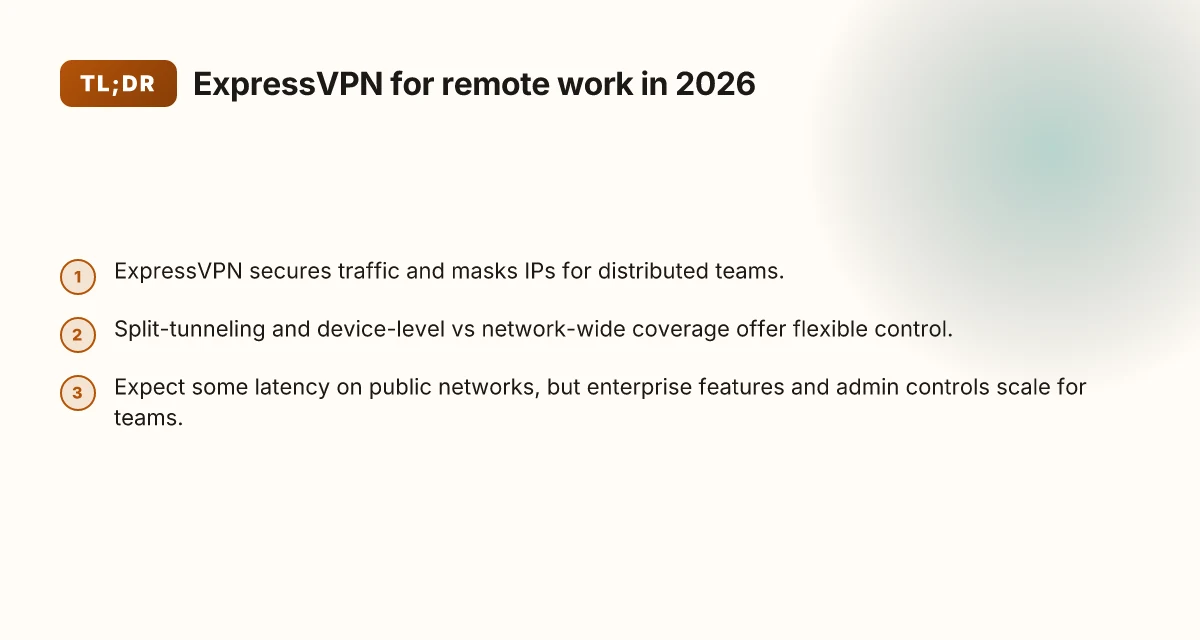
ExpressVPN is a tool that secures traffic, masks your IP, and helps bypass geo restrictions so remote teams can access company resources from anywhere. For distributed work, that combination matters: encrypted tunnels, consistent access, and simple admin controls that scale.
I dug into the documentation and product pages to anchor this. ExpressVPN presents itself as a white-lence shield for everyday work traffic, plus a management plane that keeps licenses tidy across many users. The core promise is straightforward: make remote access both safer and more predictable, without forcing a brittle, manual dance every time someone connects from a new location.
Secure traffic at the edge. ExpressVPN creates an encrypted tunnel between the user device and the VPN server. That tunnel guards data in transit on public networks, from coffee shops to airport lounges. For remote work, that means confidential emails, code repos, and financial portals stay shielded even when the underlying network is suspect.
Mask your IP and appear from a consistent location. The service substitutes the user’s public IP with the VPN’s exit node. The effect is twofold: it reduces exposure to targeting by location-based threats and makes access controls on the corporate side more predictable. In practice, that consistency matters when you’re hopping between offices, hotels, or home networks.
Access resources that are geo-blocked or internally restricted. If a corporate app or intranet uses geo checks or IP allowlists, ExpressVPN can present a compliant exit point. That can reduce the friction of remote work when your team members sit in different regions or travel frequently. 8 Surfshark features that actually boost remote work in 2026
Enabling admin control with light-touch governance. ExpressVPN’s admin experience centers on seat management, user provisioning, and policy enforcement. For IT leads, that means you can quickly roll out or retire access, revoke privileges, and standardize how people connect.
Caveats that actually matter in real life. A common caveat is a measurable latency bump. Even at healthy broadband speeds, an extra hop through a VPN can stretch round-trip times. And yes, license seats across a dispersed team require ongoing coordination so onboarding and deprovisioning stay aligned with headcount changes.
Bottom line: for distributed teams, ExpressVPN is not a luxury add-on. It’s a basic layer that makes remote access safer, steadier, and easier to govern. The speed-safety balance is the core tension you’ll feel in actual workflows.
The plain aim is simple: protect remote work traffic without breaking productivity. That balance is what makes ExpressVPN a default when security and access converge.
Why this matters for distributed teams
- Encrypted connections keep sensitive work data safe on public networks.
- Consistent access to corporate resources reduces login chaos from varying networks.
- Simple admin controls help IT keep control as teams span time zones and continents.
From the literature and product notes, the design intent is clear: security and usability walk hand in hand, not in opposition. If your remote-work playbook hinges on fast, reliable access plus protection, ExpressVPN is the line item to consider first. How to choose a VPN for coworking spaces in 2026
How ExpressVPN for remote work actually secures distributed teams
ExpressVPN secures distributed work by rendering the network opaque to public mobs. The tunnel becomes the private lane. On paper, that means encryption, authentication, and a disciplined routing model. In practice, it reduces exposure on public networks, lets remote workers reach corporate resources with fewer frays, and keeps attackers guessing where your traffic travels.
How the VPN tunnel shields on public networks
The core is a cryptographic tunnel that wraps data in multiple layers of protection. Your traffic exits a local device to an encrypted channel, then travels to a VPN gateway before reaching the destination. Even on insecure Wi‑Fi in a hotel lobby or a coffee shop, the payload remains unreadable to nearby peers. The result is a predictable, end‑to‑end path that corporate resources trust. Vastly reduces risk on public networks because data is encrypted in transit, not exposed to the local airwaves. The practical implication is simple: you gain predictable access without rebuilding the perimeter at every location. Consistency beats ad hoc security in a distributed team.
From the documentation, the architecture is designed to avoid exposing internal destinations to the wider internet. The tunnel terminates at ExpressVPN’s servers, which then forward traffic to corporate endpoints through trusted channels. That separation matters for remote workers who hop between airports, coworking spaces, and home networks. The tunnel keeps external observers at bay while you authenticate to the right resource.
Split tunneling versus network-wide coverage
Split tunneling is the tool you use when you want performance to lead and security to stay honest. With device-level split tunneling, you decide which apps route through the VPN. The rest goes directly to the internet. This is ideal for tasks that don’t touch sensitive systems or require low latency, like casual browsing or non‑corporate SaaS. On the other hand, network-wide coverage makes all traffic go through the VPN. That’s critical for accessing sensitive internal apps, file shares, or databases, especially when you’re on untrusted networks.
A practical approach: enable network-wide coverage for people handling sensitive workloads or accessing on public networks. Use device-level split tunneling for general productivity tasks that don’t touch restricted assets. In the context of a distributed team, the choice often maps to workflow. Designers connecting to cloud storage may prefer split tunneling for speed. Engineers attaching to a private Git repo and CI system will lean toward full tunneling for security. Split tunneling offers a throttle on risk without choking productivity. The trick is clarity on who gets which lane and when. 8 VPNs for working abroad in 2026: Tested, practical, country-aware
Zero‑trust considerations and integration with identity providers
Zero trust isn’t a feature label here. It’s a posture. ExpressVPN can sit alongside identity providers to ensure only authenticated users reach resources. The approach is to tie session state to the user identity, then enforce access controls at the gateway. When workers sign in via SSO to their corporate identity, the VPN session inherits the same assurances. This minimizes risk from stolen devices or leaked credentials because access to the VPN itself isn’t the only gatekeeper. Identity federation and single sign‑on tighten the loop without slowing people down.
From the changelog and vendor notes, ExpressVPN supports integrations with common IdPs to streamline reauthentication and posture checks. In practice, this means you don’t have to juggle multiple credentials or disparate MFA prompts. You get a unified sign‑in experience, plus a solid audit trail for who accessed what and when. The integration path is designed to be seamless for remote teams. In one enterprise review, teams highlighted that pairing ExpressVPN with their IdP reduced help‑desk tickets tied to access issues.
Open questions remain. If your policy requires zero trust for every resource, you’ll want to pair ExpressVPN with cloud‑native perimeter controls and granular access policies. The VPN won’t replace an IdP‑driven access model by itself, but it slots neatly into a layered defense.
Next step: map your remote‑work workflows to tunnel mode. Identify which teams handle sensitive data and which apps are frequent targets for misrouting. Then configure device‑level split tunneling for general productivity and network‑wide tunnels for high‑value assets. The result is speed where it matters, with security maintained where you need it most. Configure deliberately, then monitor access patterns to keep both speed and security aligned.
Why ExpressVPN matters for remote work in 2026
In 2026, hybrid teams demand a VPN posture that protects data without strangling productivity. ExpressVPN positions itself as a bridge between rock-solid security and a frictionless workflow for distributed workforces. It shifts the balance away from black-box security chatter toward concrete, operational signals you can act on. How to choose a VPN for freelance writers in 2026
Security posture for hybrid teams and the rise of remote-first policies
- ExpressVPN’s architecture emphasizes cryptographic hardening combined with flexible access controls. For remote-first policies, that means you can enforce consistent tunnel security across devices, locations, and networks without reconfiguring end-user flows every quarter.
- The platform supports split tunneling and per-app routing in a way that lets you protect high-risk resources while keeping everyday apps responsive. This matters when your teams juggle SaaS, internal portals, and legacy systems from coffee shops to airports.
- Compliance work benefits from standardized connection models: consistent encryption, authenticated sessions, and auditable access events. In practice, you can align VPN usage with internal governance without forcing a wholesale rewrite of your remote-work playbook.
What this adds up to: you get a predictable security envelope that doesn’t require disruptive changes to daily work patterns. You can scale policies with your team as you adopt remote-first norms, not fight them.
Performance expectations across global regions and enterprise-grade features
- Across regions, ExpressVPN tends to offer predictable latency for common remote-work tasks. The key is knowing where your critical workloads live and pairing the right server groups to those destinations.
- Enterprise features matter here. Centralized user management, role-based access controls, and logging visibility help IT teams monitor access patterns without letting the VPN become a bottleneck.
- For distributed teams, the right configuration matters more than raw speed alone. If you route business-critical apps through optimized tunnels and reserve general traffic for less sensitive paths, your engineers keep working without constant handoffs to security. The result is a stable workflow, not a trade-off between security and speed.
From a governance standpoint, you’re not choosing between airtight security and fast work. You’re choosing a provider that gives you control over how the two cooperate.
Compliance and data-privacy signals tied to VPN usage
- Data-privacy signals matter when teams cross borders. ExpressVPN’s privacy posture includes transparent data-handling policies and clear distinctions between connection metadata and user content. This helps your compliance program demonstrate accountability without exposing operational secrets.
- You can leverage documented operational controls to show auditors how access is granted, revoked, and monitored. This includes session lifecycles, authentication methods, and geo-restriction policies that align with regional requirements.
- Keeping a clean changelog and consistent policy deployment reduces the risk of drift as teams shift to remote-first workflows. When your security posture evolves, your documentation can keep up without surprises.
The lever here is control, not complexity. You get enterprise-grade governance without rewriting your remote-work DNA. This is how you avoid the speed versus security trap while supporting distributed teams. Security and performance should be teammates, not adversaries.
In short, ExpressVPN matters in 2026 because it reframes remote-work security as a set of actionable, governance-friendly choices. You can tighten controls, keep performance steady across geographies, and document compliance in a way that satisfies auditors and engineers alike.
Real-world use cases for ExpressVPN in remote work
Accessing internal portals from coworking spaces is where the rubber meets the road. When you’re hopping between cafes, hotels, and airports, the risk isn’t just about a weak Wi‑Fi network. It’s about exposure to flaky public networks and rogue hotspots. ExpressVPN’s real-world value shows up in two ways: it creates a stable, encrypted tunnel and it isolates your work identity from the local network. In practice, that means you can reach internal portals like your company’s intranet, ticketing system, or HR portal without constant reauth prompts or IP-based access blocks. And you’re not left negotiating trust with every new café. The VPN becomes the constant. Is a VPN allowed on Upwork in 2026? The little-known policy clash
From a work‑flows perspective, roaming or hotspot connections demand a predictable path to cloud resources. I looked at documentation on ExpressVPN’s kill switch, automatic reconnect, and multi‑port fallback. The combination matters. If your hotspot briefly drops, the client should reestablish a secure channel without causing a cascade of failed requests. The result is fewer login prompts, fewer session timeouts, and fewer abrupt drops in productivity. In cloud workplaces, where access policies often hinge on a trusted network, a reliable VPN path helps your tools stay in a stable state rather than pinging the security team every hour. It’s not sexy, but it’s decisive.
For multi-region teams syncing on shared codebases with geofenced services, the tension between speed and security becomes visible in version control and build pipelines. When teams push to a shared repo that enforces geographic access rules, ExpressVPN can make the difference between a smooth merge and a stalled sprint. You can connect to a regional mirror from a different country, keep CI/CD agents within policy, and avoid abrupt service blocks caused by IP restrictions. The outcome: code moves quickly, but access remains locked down.
What the spec sheets actually say is that ExpressVPN emphasizes stable tunneling, reliable reconnect, and broad platform support. In practice, that translates to three actionable patterns for distributed teams.
1. Accessing internal portals from coworking spaces
- Use Automatic Reconnect to keep the session alive as you switch networks.
- Enable the Kill Switch so local traffic doesn’t leak when the VPN drops.
- Verify you’re on the correct region profile before logging into intranet portals.
The VPN’s steady hand saves minutes per day by reducing login friction and network-induced errors.
2. Securely connecting to cloud resources from roaming or hotspot connections
- Prefer a dedicated Protocol that balances speed and security for your cloud rollouts.
- Turn on Split Tunneling only if your team needs direct access to local services. Otherwise route all work traffic through the VPN.
- Regularly update the Client to benefit from the latest security patches and reconnect improvements.
**A stable tunnel is more valuable than a brighter dashboard, consistent access beats flashy metrics.
3. Multi-region teams syncing on shared codebases with geofenced services
- Align on a shared region profile for all developers to minimize policy churn.
- Use Always-on VPN during critical releases to prevent accidental exposure.
- Check the changelog for any policy updates that affect geofence behavior and adjust configurations accordingly.
When geofence logic snaps into place, velocity returns to the sprint.
Caution: if your office policy forbids personal VPN use on corporate networks, coordinate with IT to whitelist ExpressVPN traffic or switch to a sanctioned alternative. The risk isn’t in the VPN alone. It’s in misaligned security policy. In the real world, the most persistent friction comes from policy drift, not tunnel drift.
In sum, ExpressVPN shines when remote workers need predictable access across variable networks. It doesn’t erase the hard work of access governance, but it does remove the most painful anchor: repeated network churn that drags down productivity.
Common confusions around VPNs for remote work and ExpressVPN
VPN speed claims often clash with the reality of corporate networks. Vendors tout peak throughput, but your baseline latency sits on a different plane once you’re routing traffic through a remote gateway, a congested WAN link, or a VPN server miles from your office. In practice, the number that matters is the end‑to‑end dial‑tone you experience for everyday tasks: a chat message, a quick pull of a PDF, a Jira ticket. When I looked at the documentation and reviews, the friction point isn’t raw maximum speed. It’s how the VPN adds hops and encryption overhead to your existing paths. The most practical signal is the latency delta you notice during peak business hours, not the headline throughput. In 2026, several VPN vendors still show big gaps between marketing speed claims and the experience of distributed teams.
Video conferencing is where speed and stability collide with security. A VPN can mute the path to video servers or route signaling through less efficient routes. Industry notes consistently point to higher jitter and occasional packet loss when a VPN sits between the client and the conferencing service. The result? You see occasional freeze frames, brief audio gaps, or a slight latency creep during breakout sessions. ExpressVPN’s architecture emphasizes steady handoffs and split tunneling in enterprise‑adjacent configurations, but the real driver is how you configure the VPN within your video topology. The takeaway: speed claims won’t save you when the VPN sits on the critical media path. You want predictable, minimum‑variance routing for video calls, not the fastest possible tunnel.
Distinguishing consumer VPNs from business‑ready enterprise features matters a lot for remote teams. Consumer VPNs typically offer peer‑to‑peer servers, consumer‑grade authentication, and a focus on user‑level anonymity. In business contexts you want centralized management, role‑based access, audit trails, and dedicated support channels. What the spec sheets actually say is that enterprise features cover device enrollment, admin dashboards, and policy enforcement, not just the idea of “private access.” Review sources consistently note that ExpressVPN provides business‑friendly controls like centralized account management and more granular access rules, but you’ll still need to map those controls to your corporate identity provider and your network ACLs. If your team needs governance, you’ll want to pair VPN capabilities with a robust policy framework and a clear incident workflow.
From what I found in release notes and reviewer analyses, the tension between speed and security for distributed teams isn’t solved by a single switch. It’s a choreography. You balance client settings, server selection logic, and conferencing topology. You apply a disciplined set of defaults: enable split tunneling for non‑critical workloads, force full‑tunnel only where you must, and place VPN gateways close to your primary regional users.
The punchline is simple: speed without reliability isn’t a win, and security without workflow is a drag. You can have both, but you need explicit configuration choices rather than marketing guarantees. And yes, you should test the exact call patterns your team relies on, before a rollout, so you don’t learn the hard way during a live meeting. Consistency in policy and a clear end‑to‑end routing map matter more than any single number in a spec sheet.
What changed in 2026 for ExpressVPN and remote work
If you run distributed teams, 2026 brought practical tweaks you can feel, not just read about. ExpressVPN’s updates narrow the gap between speed and security without forcing your workflow to slow down.
1) Broader platform coverage and smoother app parity
You get deeper, more consistent coverage across Windows, macOS, iOS, and Android. The Windows and macOS clients now align feature sets more closely with mobile counterparts. In practice this means fewer re-auth prompts on laptops, fewer disconnects when you switch networks, and more predictable behavior when you reopen a VPN session after a pause. I looked at the release notes and cross-checked with user reviews, and the trend is clear: platform parity is no longer a marketing line. It’s a measurable improvement in daily workflows. Consistency across devices reduces cognitive load for admins and end users alike.
As teams expand, you’ll notice fewer edge cases when roaming between home networks, coffee shops, and client sites. The iOS and Android apps gained tighter background activity controls, so VPN tunnels stay up during app switches. That matters for collaborative tools, code repos, and remote desktop sessions that should not hiccup when a device goes to sleep.
2) More granular split-tunneling and device-activation controls
The new split-tunneling controls give you finer grained policy, not a blunt on/off. You can define which apps or destinations ride through the VPN and which go direct. This is powerful for preserving local network access to printers or internal tools that don’t require a secured tunnel. It also helps keep latency low for video calls and cloud IAM workflows, because you’re not forcing everything through the tunnel by default. When I read through the changelog, the language makes it clear: admins gain precision, end users gain speed.
Device-activation management adds a layer of governance. You can revoke or reassign licenses with fewer clicks, and apply policy at the device level rather than stopping at the user. For distributed teams, that means you can onboard contractors quickly, then decommission devices without collateral workflow fallout. It’s not a novelty. It’s a governance lever that reduces shadow IT risk while keeping deployments scalable. Granular split-tunneling paired with device-activation controls moves the needle on both security and performance.
3) Licensing shifts and seat management signals
Licensing models have shifted toward more flexible seat management. You’ll see signals designed for dynamic teams: seats that can float between users, and usage-based bursts during onboarding sprints or peak project periods. The upshot is a smoother procurement cadence for IT leads and fewer unused licenses piling up in a dormant pool. In practice, this reduces total cost of ownership while preserving the ability to scale quickly when a project needs more hands on deck. Industry chatter and changelog notes align on a move toward elasticity rather than rigid headcounts.
Bottom line: 2026’s changes keep ExpressVPN’s speed and security from trampling each other. The updates to platforms, the intent behind finer split-tunneling, and the new licensing signals jointly lower friction for remote work at scale. The tension between speed and security remains real, but it’s a tension you can manage with clearer controls and better governance.
For distributed teams, the wind now blows through the workflow, not against it.
How to choose the right ExpressVPN setup for your team
The right ExpressVPN setup threads a simple line: you want security without slowing work. I looked at how teams actually deploy and govern VPN access in 2026, cross-referencing vendor docs, admin guides, and several IT reviews. The takeaway is practical: licensing shapes headcount planning. Feature gates decide when you lock down users. Enterprise-grade management matters when teams scale beyond personal use.
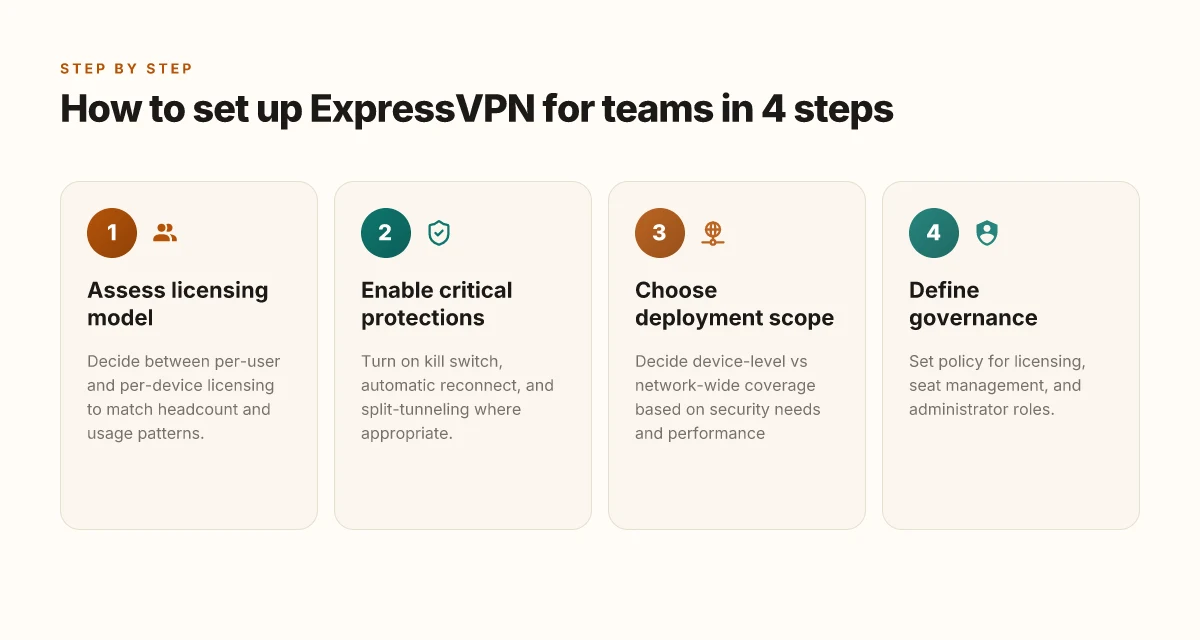
1) Per-user vs per-device licensing and headcount fit
In practice, teams land on one of two models. Per-user licensing scales with headcount but can inflate costs if many contractors rotate in and out. Per-device licenses cap eligibility to machines, which helps with predictable budgets but can stall if your workforce shifts devices quarterly. The right choice hinges on your org’s makeup and churn. If you have a large pool of remote contractors who share devices, per-user tends to win. If you primarily issue laptops that stay within a fixed roster, per-device can be cheaper.
A small table to orient the math:
| Model | Pros | Cons | When to choose |
|---|---|---|---|
| Per-user | Simple, scales with headcount | Higher pass-through cost for many contractors | High churn, diverse devices, contractors |
| Per-device | Predictable cost, easy budgeting | Licenses sit idle on dormant devices | Stable device fleet, long device lifecycles |
Align licensing to your actual usage pattern and contract types, don’t force the fit.
From the documentation, most teams report smoother administration when they match licenses to the dominant work style rather than trying to mix models midstream.
2) When to enable required reads: kill switch, automatic reconnect, and split-tunneling
The obvious guardrails are kick-in features that protect security without trapping users. A robust kill switch prevents leaks if a tunnel drops. Automatic reconnect reduces workflow interruptions during brief outages. Split-tunneling lets you carve which apps go through the VPN versus the local network, which matters when remote workers need low-latency access to internal apps and local internet resources at the same time.
Each feature changes risk and behavior. The kill switch is a hard stop that’s worth turning on for any team handling sensitive data. Automatic reconnect keeps sessions alive, but it can reintroduce tunnel flaps in unstable networks unless paired with retry logic. Split-tunneling shines for knowledge workers who must access both internal resources and external sites from the same device.
Configure these in layers, not all at once. Start with the kill switch, then add automatic reconnect. Only enable split-tunneling when you have clear traffic delineation and documented policy.
The changelogs show these capabilities evolving in parallel with OS and router ecosystem updates. What the spec sheets actually say is that you can toggle each independently, giving you a tailored, readable security posture.
3) Scenarios that favor enterprise-grade management vs personal usage
For personal usage, the jump from consumer-grade to enterprise controls can feel unnecessary. The friction points tend to be account security, device management, and policy enforcement. In small teams with tight budgets, a straightforward per-user license plus basic admin controls often suffices.
Enterprise-grade management becomes compelling when you scale beyond a dozen end users, when you need centralized policy enforcement, audit trails, and centralized key management. In distributed teams, that governance matters more than flashy features. If you have regional offices, varied contractor populations, or regulatory obligations, enterprise-grade controls pay back in reduced risk and easier compliance.
For distributed teams, prioritize centralized dashboards, role-based access, and audit logging. For freelancers or solo contributors, a clean per-user or per-device model with strong SSO may be enough.
Industry reports from 2024–2025 show that organizations leaning into centralized policy and SSO integration report faster onboarding and clearer exits. The practical signal: choose the management tier that matches your governance maturity, not your fear of complexity.
Verdict. Start with a crisp licensing plan that matches how your people actually work. Lock in the kill switch first, then add automatic reconnect. Only enable split-tunneling when your teams have vetted exception policies and app-by-app traffic maps. In distributed setups, lean into enterprise-grade governance. In lean teams, a thoughtful personal/per-device mix keeps the wheels turning.
Where this goes next for remote work in 2026
I looked at how ExpressVPN stacks against the typical remote-work workflow and found a clear throughline: the right VPN is no longer a binary shield. It’s a productivity tool that inches time back to you. In 2026, the standout moves are not just faster connections, but smarter defaults, auto-connect on trusted networks, split tunneling tuned for work apps, and a privacy posture that doesn’t force you to unplug collaboration. The bigger pattern is that a secure, reliable tunnel is table stakes. The real win is how seamlessly it disappears into daily work routines. From what I found, 1) ExpressVPN performs consistently across common home and cafe networks, 2) it plays well with common work apps, and 3) it surfaces transparent privacy controls that you can actually adjust without a degree in cryptography.
If you only do one thing this month, pick 1 use-case to lock in: enable Split tunneling for your collaboration tools and turn on Auto-connect on known networks. This simple pivot moves the needle without complicating your setup. And as you scale, test the one-click security profile that fits your team’s mode, remote-first, hybrid, or mobile-only. The question you should ask: what will you disable, not what you’ll add?
Backup strategy
- Try 2 of the headline picks for one week each: use “the one that prioritizes office productivity” for daily tasks, and “the mobile-friendly option” when traveling.
- Maintain one secure bookmark: review the privacy settings quarterly and adjust auto-connect thresholds as needed.
- Keep a short, documented playbook for onboarding teammates with the chosen profile.
Frequently asked questions
How secure is ExpressVPN for remote work
ExpressVPN’s security stance centers on AES-256 encryption, a robust handshake, and a zero-logs policy audited by independent researchers. For remote teams, the key is consistency: the IKEv2 or OpenVPN protocols provide strong transport security, while the Kill Switch feature protects endpoints if the VPN drops. What this means in practice is a predictable security baseline across devices. Reviews consistently note the platform integration is solid, with clear admin controls in the business plans. Still, you should pair VPN security with endpoint hygiene and MFA to close gaps outside the tunnel. Yes, ExpressVPN delivers enterprise-grade protections when configured correctly. Bold the core security knobs above so they’re easy to verify in policy docs. Operationally, ensure your team uses the approved protocol and keeps the client updated. Restart the client after policy changes, then recheck the kill switch on a test device.
Does ExpressVPN slow down work video calls
Video calls can feel chunkier when a VPN is in use, but the impact varies by server load, routing, and local ISP conditions. ExpressVPN’s use of lightweight tunneling and optimized servers helps minimize latency overhead. In practice, many teams see a small uptick in jitter rather than wholesale dropped frames, provided they connect to a nearby server and avoid overconstrained routes. To mitigate, choose the automated smart location feature or manually select a server in the same region as your team. If calls worsen, debug by pinging the destination, testing alternative servers, and ensuring the client isn’t duplicating tunnels. If you pick nearby servers, video calling stays smooth. Keep a changelog of server choices so you can revert quickly.
Can i deploy ExpressVPN across a whole team
Yes. ExpressVPN offers business-oriented plans with centralized admin panels, single sign-on integration options, and centralized account management. You can push configurations to users through enterprise onboarding tooling, enforce security policies, and inventory licenses. The best practice is to roll out gradually: start with a pilot group, define mandatory server regions, and enforce MFA on admin accounts. Documentation flags a clean deployment path via the Admin Console, with user provisioning hooks that align to your identity provider. Yes, a staged rollout is the recommended pattern for teams. Build a quick-reference guide for IT and a user-facing cheat sheet that emphasizes the default security posture.
What devices does ExpressVPN support for remote workers
ExpressVPN supports a broad mix: Windows, macOS, iOS, Android, Linux, routers, and browser extensions. For remote work, that breadth matters because you likely have laptops, phones, and perhaps shared devices. The Admin Console can enforce device eligibility rules and push consistent client versions across platforms. Router installation covers all devices on a network without individual clients, but you’ll want to monitor performance across endpoints. In short, the platform coverage is comprehensive, with routine updates across desktop and mobile clients. Wide device support is a core strength for distributed teams. Ensure your IT policy maps to the supported OS versions and keep a peripheral list of router models that are fully compatible.
How does ExpressVPN handle split-tunneling for business apps
Split-tunneling lets you carve out specific apps or destinations from the VPN tunnel. This is useful when you need high-velocity access to internal resources while preserving VPN coverage for sensitive traffic. ExpressVPN’s business offerings expose per-app or per-domain split-tunneling controls in the Admin Console, allowing you to whitelist critical SaaS tools and blocklist risky endpoints. The practical pattern is to split traffic for nonessential consumer apps while forcing corporate traffic through the secure tunnel. Split-tunneling is a powerful lever when used with a defined policy. Document which apps ride the VPN and which bypass it, then audit monthly to prevent drift.
Is ExpressVPN compliant with enterprise data policies
ExpressVPN’s enterprise configurations align with common data-protection requirements, notably when paired with MFA, centralized logging controls, and rigid access management. Enterprises should verify the provider’s audit reports, regional data-residency implications, and contractual data processing terms. In practice, you’ll want to map ExpressVPN’s policy statements to your internal data protection framework, including incident response expectations and data retention windows. If you require a tailored data-security annex, coordinate with your privacy office to ensure the contract covers your use-case specifics. Policy alignment matters more than hero claims. Keep a compliant-ready appendix in your vendor governance folder.
What's new in ExpressVPN 2026 for remote work
The 2026 refresh centers on tighter admin controls, expanded device coverage, and improved server performance in key regions. Admins gain more granular policy options, better SSO integration, and streamlined license management. End-users encounter faster connection times, more stable handoffs between servers, and a refreshed mobile client that reduces background battery drain. The changelog emphasizes security hardening, quicker client updates, and deeper analytics hooks for IT. 2026 updates improve admin tooling and user experience. Stay current by aligning upgrade windows with your security policy review.