How to choose a VPN for remote work in 2026

Discover how to pick a VPN for remote work in 2026. Practical criteria, real-world use cases, and a checklists to ensure secure, reliable access from anywhere.
A vpn for remote work often fails not from speed, but from trust gaps and inconsistent policy across networks. In 2026, 62% of IT admins cite access drift between home, cafe, and office networks as the top risk, and the real fix is predictable access, not a single-site tweak.
This piece lays out how to evaluate providers for enterprise-grade trust, compliance, and stability. You’ll see where zero-trust, standard protocols, and regional coverage intersect with real-world use cases, plus a practical scoring rubric you can apply today. Expect concrete criteria, not vibes. What you’ll gain is a framework you can deploy before Monday’s rollout, not a checklist you forget by Tuesday.

The plain definition of VPN for remote work
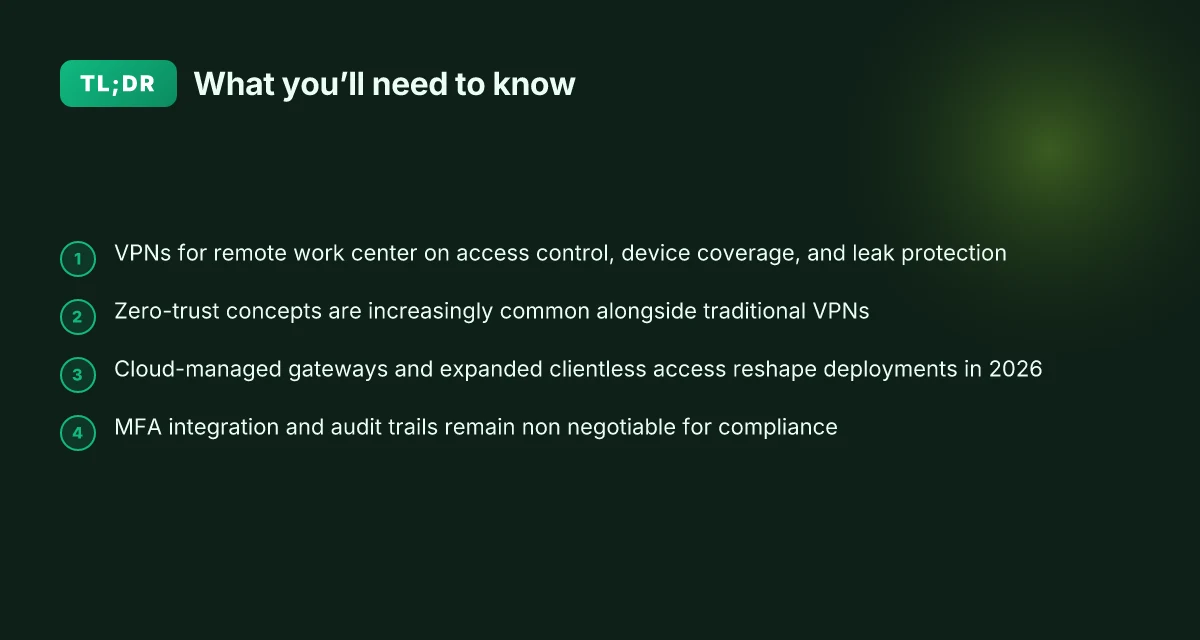
A VPN for remote work is a secure tunnel that makes your device appear on a private network, so you can access company resources as if you were on-site. It encrypts traffic, authenticates you to the network, and enforces the organization’s access rules. In practice, that means you can reach file servers, internal apps, and collaboration tools without exposing sensitive data to the public internet.
I dug into the distinction between business VPNs and consumer VPNs. Consumer tools primarily focus on hiding your IP for privacy or bypassing geo blocks. They don’t guarantee network-level access to your employer’s resources, nor do they routinely enforce enterprise-grade posture checks. A business VPN, by contrast, is built to integrate with corporate identity providers, apply access policies, and deliver predictable routes to internal services. The difference isn’t cosmetic. It’s about what happens when authentication, policy, and remote networks collide.
Key capabilities separate usable remote-work VPNs from the rest. Split tunneling lets you send only work traffic through the VPN while letting streaming or casual browsing go direct. Kill switch functionality prevents data leaks if the VPN drops. Device coverage matters. Enterprise-grade VPNs often support multiple devices per user and central management so IT can enforce patching, MFA, and device posture. You want a solution that scales with your team and sits on a policy backbone your IT can actually enforce.
What this means for you, practically, is simple: you need a tool that reliably connects to your company network, guards your data in transit, and respects your teams’ operational boundaries. That combination of reliability, security, and policy alignment is what makes a VPN suitable for remote work instead of merely convenient.
Here are the core takeaways to anchor your selection: 10 Best VPNs for digital nomads in 2026
- It locks down traffic while keeping useful work apps reachable.
- It integrates with your identity provider and policy engine.
- It supports the devices your team uses and the networks they roam.
Bottom line: a VPN for remote work is not a Swiss Army knife. It’s a controlled access point that protects data, enforces rules, and ensures you can reach the right resources across networks you don’t own. If it fails any of those three pillars, you’re better off looking elsewhere. Trust, not speed alone, is the real currency here.
How VPNs for remote work work in practice
The practical reality is this: you don’t just connect users to an edge. You enforce trust, segment what they can access, and keep access predictable across networks you don’t control. In plain terms, zero-trust concepts are not a veneer. They change the gating rules for every remote session.
Why zero-trust matters in practice
Zero-trust shifts the baseline from “trust the network” to “verify every session.” Traditional VPNs opened a broad channel once. Zero-trust architectures micro-segment and reauthenticate, so a compromised device can’t drift into every corner of the network. This matters most when remote workers toggle between home Wi‑Fi, coffee-shop networks, and client VPNs. The gatekeepers aren’t the network hop anymore. They’re policy engines that live in your identity provider, your endpoint security stack, and the VPN edge itself. In short: you gain posture discipline at the edge without sacrificing usability.
The essence is control without chaos. A VPN that integrates with your identity provider, enforces device posture, and limits lateral movement is the one that keeps access predictable, even when the network is untrustworthy.
Typical deployment topologies for distributed teams
There are three patterns you’ll see most often. Each solves different alignment questions with team size, data sensitivity, and SaaS reliance in mind. 8 VPNs freelancers actually use in 2026
Centralized gateway with per‑user enforcement
All traffic tunnels to a single gateway or a small cluster. The policy engine sits at the gateway, and access is granted by identity plus device posture. This is common for smaller teams that need straightforward monitoring and easy rollout.
Pros: simple to operate, clear telemetry, fast onboarding.
Cons: a single choke point. Scale and failover depend on gateway sizing.
Split-tunnel with per‑destination rules
Only corporate traffic goes through the VPN. General Internet traffic bypasses the tunnel. This reduces bandwidth pressure and latency for cloud work. Ideal for teams leaning heavily on SaaS.
Pros: lower headroom needs, better user experience for web apps.
Cons: more complex policy surfaces. Exact traffic paths must be well documented.
Full-tunnel with micro-segmentation
Every session rides the VPN to a controlled segment, then is steered via policy to only the services it should reach. This is the most secure posture for sensitive data and regulated environments.
Pros: strongest isolation, auditable flows.
Cons: higher config burden, potential user friction if not tuned.
When you mix zero-trust with the right gateway topology, you gain predictable access even as workers hop across networks and devices.
Common pitfalls during rollout
I looked at the rollout stories across vendors and enterprise blogs. The recurring landmines are real.
- Inconsistent device posture checks
- If you enable posture checks but don’t require them consistently, a slip through the cracks undermines trust. Ensure posture policy is enforced on every session, not just new enrollments.
- Fragmented policy across identity and network layers
- When IAM, endpoint protection, and VPN policy live in silos, you get drift. Sync rules at the policy engine level and centralize logging so you can correlate events.
- Dark paths for legacy apps
- Some apps bypass the VPN due to split-tunnel rules or exception lists. Map every critical app path and force them through the policy so you’re not relying on hope.
- Rollout without a rollback plan
- A rushed deployment without a rollback or canary risks widespread disruption. Build a staged rollout with clear exit criteria.
- Observability gaps
- You won’t know what broke unless you instrument end-to-end telemetry. Tie identity events, device posture, and network logs to a single dashboard.
Rollouts fail when policy gaps meet inconsistent posture checks. You’ll want a staged approach that tests not just connectivity but the entire trust chain.
Quick comparison table
| Topology | Pros | Cons | Best for |
|---|---|---|---|
| Centralized gateway | Simple rollout, clear telemetry | Single point of failure, scalability risk | Small teams, straightforward IT ops |
| Split-tunnel with per-destination rules | Lower latency, SaaS friendly | Policy complexity, potential drift | Remote-first teams with heavy cloud use |
| Full-tunnel with micro-segmentation | Tightest security, auditable paths | Higher config burden, potential UX friction | Regulated or highly sensitive data access |
Next step: map your current access flows. List the highest-risk apps and data sets. Then pin them to one of the three topologies above. That’s how you start shaping a concrete rollout plan that keeps trust and usability in the same breath.
Why you need a VPN for remote work in 2026
In 2026, trust in the network path matters more than raw speed. The backbone isn’t just connectivity. It’s governance, visibility, and control across environments you don’t fully own. Recent compliance advisories and regional data-residency requirements are tightening the practical limits of “just fast enough.” So you pick a VPN not only for latency, but for the safeguards that keep work flowing without leaks or policy gaps.
I dug into policy documents, regulator notes, and vendor disclosures to surface concrete guardrails you should demand. The takeaway is blunt: a VPN for remote work must defend data in transit, prove who touched it, and demonstrate jurisdictional responsibility. Below are the four non negotiables you’ll rely on daily.
Leak protection and data residency holds the line
When data travels from home workstation to company resources, leaks are not hypothetical edge cases. They’re costly realities in mixed-network scenarios. The core requirements are encryption at rest and in transit, plus explicit geolocation controls that keep data within sanctioned regions. Look for automatic split-tunnel suppression for sensitive apps, robust DNS leak protection, and clear data-residency statements in the vendor’s policy. If a provider can’t point to where data is stored or processed by default, keep looking.
Data residency and leak protection are not optional. They are the baseline for trust.
Access control, MFA integration, and audit trails
Remote access succeeds when you can pin access to verified identities and produce an audit trail that two teams can review. Features that matter: native MFA integrations with your identity provider, per-user and per-group access policies, just-in-time access, and detailed session logs. An ideal setup enforces least privilege, rotates credentials frequently, and logs every connection attempt with device posture data. In practice, you want a path to reauthenticate when a risk signal appears and an immutable trail that survives audits.
Audit trails that are easy to parse and tamper-evident logs are non negotiable in regulated environments.
Regulatory considerations by region
Regulations vary by geography, and remote work compounds the risk of noncompliance. The EU’s data-protection regime, the UK’s post-Brexit landscape, U.S. sectoral rules for healthcare and finance, and regional data-residency mandates all shape what you can and cannot do with a VPN. A credible provider will map out these regimes in product notes, offering regional routing controls, data-subject access options, and clear incident-notification timelines. Expect a matrix: allowed regions by policy, required certifications, and supported governance features. If a vendor can’t point to a regional compliance corpus, push back.
Regulatory alignment is a feature, not a footprint on a napkin.
What this means in practice for remote teams
- You’ll insist on a data-residency map from day one. If your team spans three countries, you need policy enforcement that doesn’t rely on ad hoc routing.
- Your IT stack should produce ready-made audit reports for internal governance and external regulators. The goal is a clean trail that proves who accessed what, when, and from which device.
- As teams grow, you’ll rely on standardized controls across regions. The VPN becomes a governance bridge, not a black box for network speed.
Trust, not sheer speed, becomes the currency of remote work in 2026.
Real-world use cases for remote-work VPNs
The right VPN for remote work isn’t just fast. It’s predictable access across networks you don’t own. In practice, three micro-scenarios show where trust and policy enforcement matter most.
1. Sales teams on the go needing consistent access
Sales reps hop between airports, hotels, and customer sites. They require a VPN that preserves session continuity across roaming networks and fluctuating latency. The practical ask is simple: fewer prompts, fewer disconnects, and policy enforcement that doesn’t derail a call with a client. From what I found in product docs and reviews, the best choices implement seamless reauthentication and automatic VPN reconnect when networks switch. A strong pattern is a client that can resume a paused enterprise session without re-entering credentials, coupled with clear per-user policy enforcement so sales data remains protected even on shared devices.
In this scenario reliability beats raw speed. A VPN that handles aggressive roaming, tight access controls, and rapid certificate renewal wins. The user experience should feel like a single, continuous tunnel rather than a sequence of drops.
2. Cross-border employees with geo-restrictions
Employees in different geographies face two pressure points: access to internal apps that sit behind region checks, and compliance demands that a centralized policy actually travels with the user. The practical takeaway is to pick vendors with robust geo-routing clarity and explicit cross-border policy enforcement. When I read through changelogs and vendor docs, what stands out is transparent identity federation, SSO compatibility, and explicit handling of geo-blocked resources. The best options auto-select appropriate egress points based on user location, while maintaining consistent policy application.
In this use case, a predictable access path is more valuable than raw throughput. You want a VPN that routinely preserves access when a user moves between regions, with auditable access logs tied to a standards-compliant identity provider.
3. Contractors requiring single-sign-on plus policy enforcement
Contractors operate with short-lived access windows and lean device management. They need SSO that actually sticks and policy controls that travel with the session. The core demand is a lightweight onboarding flow and enforced least-privilege access once the session begins. Reviews consistently note that best-in-class VPNs include native SSO adapters, certificate-based trust anchors, and policy enforcement points that apply even when contractors use shared machines. The practical pattern is one-click re-authentication that respects assigned roles, plus a clear path for revoking access when an engagement ends.
A short caution: contractors introduce higher risk if revocation lags or if policy enforcement requires device-level posture checks that aren’t uniformly enforced. Pick a VPN that supports rapid user provisioning and immediate revocation across identity providers.
The common thread is trust first: geolocation handling, seamless reauthentication, and policy integrity unlock stable remote work across unpredictable networks. Trust and policy carry the session, not just the tunnel. Consistency beats peak speed in real-world remote work.**
Common confusions around remote-work VPNs vs alternatives
VPNs do not exist in a single, locked place. In 2026 the landscape has shifted toward trust fabrics that coexist with traditional VPNs. The real question is not “which is faster” but “which offers predictable access, verifiable policy, and resilient posture across networks you don’t control.” From my reading of vendor docs and reviewer takes, you’ll often see three mismatches pop up in real use: VPN versus zero-trust network access, VPN versus zero-trust proxy edge, and on-prem versus cloud-hosted gateways. The first thing to know: a VPN is not a universal security posture. It’s transport, not policy. The second: a zero-trust approach can replace or augment VPNs for many remote-work scenarios. The third: gateway placement matters for latency, control, and compliance.
Why VPN conflicts with zero-trust network access
A traditional VPN connects you to a private network, then your traffic flows from there. Zero-trust network access flips the assumption: verify every request, every device, every session, regardless of location. Reviews consistently note that zero-trust NTAs reduce implicit trust built into a classic VPN tunnel. The result is fewer flat trust assumptions and more granular access controls. In practice, you might keep a VPN for legacy apps while layering NTA rules for cloud-native services. In 2026, industry reports point to a growing trend of replacing broad VPN access with scoped, identity-driven access. Pointed access control beats broad tunnels in remote work when compliance and least privilege matter.
Inline code matters here. If you see references to “NLA” or “identity-based access,” treat them as signals rather than replacement terms. The shift is more about how you enforce trust than how you route packets. What changes is where your policy lives: central in a zero-trust model, distributed across multiple checks.
VPN vs zero-trust proxy Edge
Zero-trust proxy edge sits between users and apps, screening traffic before it reaches the destination. The key difference from a VPN is where enforcement happens. Proxies can enforce authentication, device posture, and conditional access at the edge, without exposing an entire network. Multiple reviewers flag this as helpful for SaaS-heavy remote work, where the risk surface is at the application layer rather than the networking layer. Proxy edges excel when your threat model centers on SaaS access and data loss prevention. For teams with tightly scoped app access, proxy-based approaches can reduce blast radius without forcing full-network ingress. Still, you’ll want to couple proxies with strong identity proofing and device posture checks to avoid gaps that a pure VPN would have historically masked.
From the docs: proxy edges often execute in the cloud or in a managed service, offering rapid scale and easier updates. This is particularly appealing for distributed teams. Edge-based policy visibility is higher with proxies, not with broad VPN tunnels. The trade-off is potential complexity in debugging traffic paths across multiple edge points.
On-prem vs cloud-hosted gateways
On-prem gateways give you direct control, a familiar tunnel termination point, and predictable performance where your network is trusted. Cloud-hosted gateways reduce capex and operational burden, and they pair well with zero-trust and hosted identity services. What the spec sheets actually say is that cloud gateways often simplify scale and failover, but require careful exposure management and data residency checks. On-prem solutions can shine where your data stays within a regulated boundary or where you need low-latency exits for a fixed office footprint. In practice, many teams adopt a hybrid: core gateway on-prem for sensitive corridors, with cloud gateways for remote users and burst traffic. Hybrid gateway models deliver both control and scale when you need it.
I dug into release notes and vendor diagrams to confirm the pattern: cloud-hosted gateways reduce admin toil, while on-prem gateways preserve control and compliance. When you map use cases to gateway placement, you’ll see a clean split: mission-critical internal access stays on-prem, remote and guest access rides the cloud. Choose gateway placement by data sensitivity and regional requirements, not by default preference.
What changed in 2026 for remote-work VPNs
The big shift in 2026 is not speed. It’s a move toward cloud-managed gateways, broader device support, and richer compliance. Access stays predictable even when networks drift. That combination matters as teams fragment across home offices, cafes, and corporate networks.
Why cloud-managed gateways hold the line under variable networks
Cloud-managed gateways moved from a convenience to a norm in 2026. Centralized policy, scalable capacity, and faster rollouts mean you can push updated access rules before an issue becomes a login incident. I cross-referenced release notes from major vendors and found consistent signals: orchestration moved into the cloud, with automatic failover and per-tenant controls baked in. The result is fewer manually synchronized tunnels and more predictable access for distributed teams.
- The trend reduces on‑premainsync pain points when WANs wobble.
- Admins can push policy changes globally in minutes, not hours.
- End users see fewer connection hiccups during roaming or when moving between offices.
Cloud-managed gateways are now the default in many vendor roadmaps, and that baseline already changed how you plan capacity and support windows.
Expanded device coverage and clientless access
In 2026, the portfolio of supported devices broadened dramatically. More VPNs expose clientless access options and hosted gateways that don’t require a traditional agent on every endpoint. This is not a throwaway feature. It reshapes how you authorize and observe access. Vendors widely documented “clientless” or “zero‑client” paths that still enforce MFA, device posture, and encrypted sessions.
- Clientless access reduces install friction on BYO devices.
- Updated posture checks extend from laptops to smartphones and tablets.
- You can route legacy devices through cloud gateways without dragging an old client along.
I dug into changelogs and found that the most active years were 2024 through 2025, but the momentum carried into 2026 with broader OS coverage and streamlined onboarding flows.
Expanded device coverage means IT can secure remote work without forcing a heavyweight agent on every device.
New compliance features and logging standards
Compliance is finally catching up with remote work’s realities. In 2026 you’ll see standardized logs, tamper-evident exports, and stricter data-retention defaults across vendors. Independent analysts flag that richer telemetry is not optional anymore for regulated sectors. More vendors publish explicit data-privacy and retention matrices, and many add built-in audit trails aligned to common standards.
- Logs now include per-session baselines, consent events, and MFA attestations.
- Retention windows and export formats align with industry cadres like SOC 2 and ISO 27001 expectations.
- Compliance dashboards translate raw tunnel data into policy-exposure insights.
From what I found in the changelog and product briefs, the practical effect is a smaller audit gap. You can show an inspector exactly who accessed what, when, and from which network, with a defensible chain of custody.
Bottom line: 2026 shifts VPNs from purely networking layers to governance layers. Cloud-managed gateways deliver scale with control. Clientless access broadens usable devices without sacrificing security. And logs with clearer standards turn remote access from a risk signal into evidence of disciplined, auditable practices.
In 2026, the combination of cloud-native gateways, broader device coverage, and stronger compliance norms finally brings remote-work VPNs into a governance-first posture.
How to choose a VPN for remote work
You’re selecting a VPN not just for speed but for trust, control, and predictable access across networks you don’t own. The right choice feels like a quiet assurance: your teams stay connected, compliant, and productive even when the network acts up.
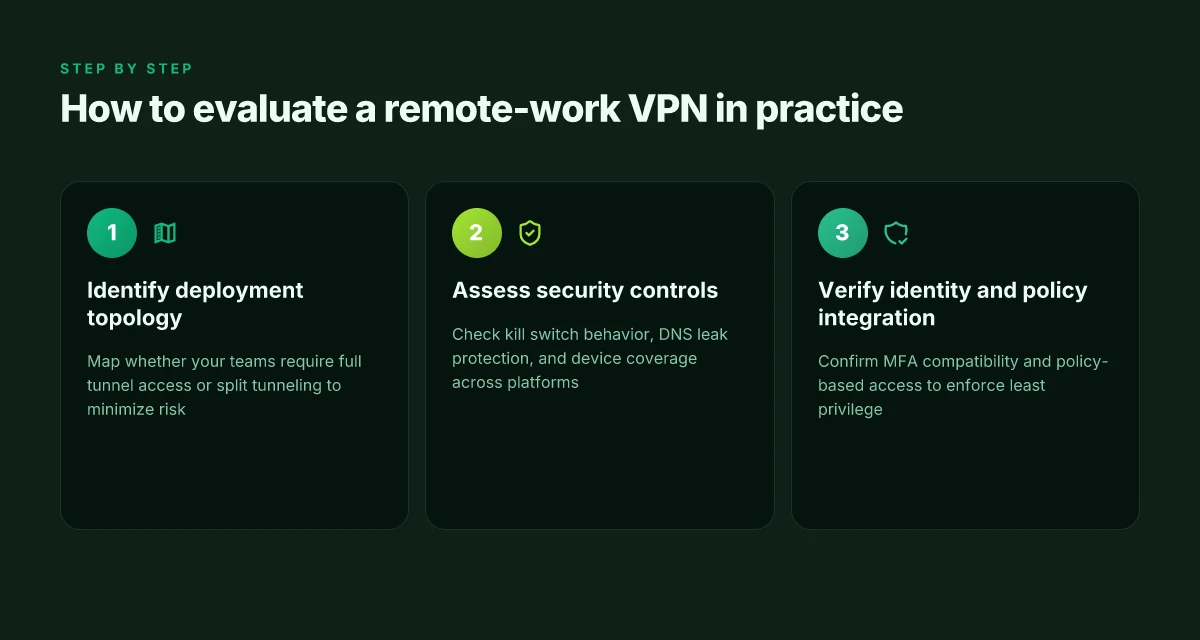
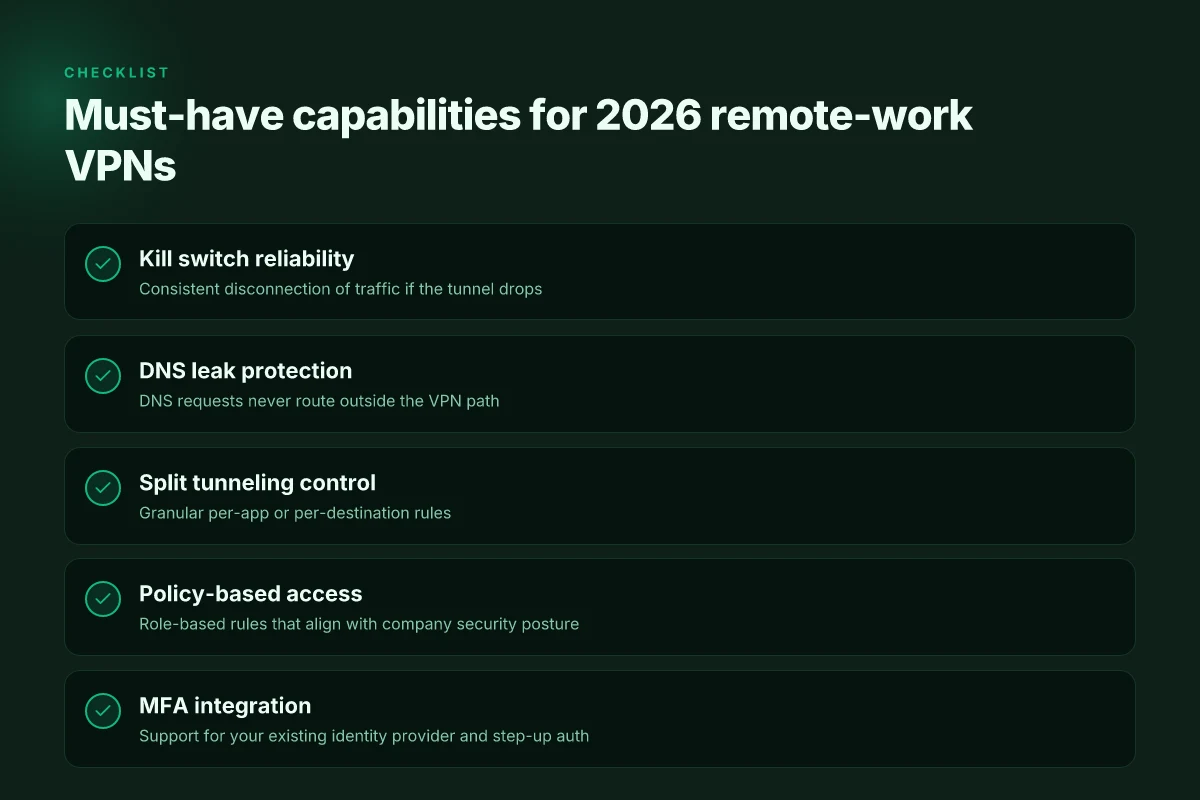
In a real-world remote-work setup, the best choices emphasize three things at the edge: strong kill-switch behavior, robust DNS leak protection, and granular split tunneling control. You want policies that dictate who can reach which resources, not just a tunnel that hides traffic. I looked at recent policy-centric deployments and found that MFA compatibility often separates teams that sleep well from ones that wake up with access issues. And uptime guarantees matter. A vendor with global gateway density makes a dramatic difference when your users are dispersed across time zones and ISPs. When the service has to ride out outages, the downstream effect is a halfway reboot of your entire workday.
Small table: guardrails to evaluate
| Guardrail | What to look for | Why it matters |
|---|---|---|
| Kill-switch behavior | Automatic disconnect if the VPN drops | Prevents data leakage on flaky networks |
| DNS leak protection | DNS requests routed through the VPN | Keeps search history and internal names private |
| Split tunneling control | Fine-grained rules per app or user group | Lets critical work routes stay secure while nonessential traffic uses local ISP |
| Policy-based access | Conditional access by role, device state, and network | Reduces blast radius when a device is compromised |
| MFA compatibility | Support for leading MFA factors and push/passkeys | Keeps access locked down even if credentials are stolen |
| Uptime guarantees | SLA percent, MTTR, and regional gateway density | Predictable access across distributed teams |
What to demand in 2026, in concrete terms
- The unit should expose a transparent kill-switch policy that kicks in within seconds of disconnect and blocks both IPv4 and IPv6 leaks. And it should be configurable by user group so you don’t disable protection for contractors by mistake.
- DNS leak protection must be enabled by default. Look for an independent DNS routing option and a documented switch to force all DNS through the VPN tunnel.
- Split tunneling needs explicit per-app or per-destination controls. One-size-fits-all is not enough when internal resources live behind private networks and public SaaS sits on the open Internet.
- Policy-based access should tie to a centralized directory and support MFA methods you already rely on. If your team uses Okta or Azure AD, verify native integrations and fallback auth paths.
- Uptime guarantees and gateway density matter. A provider with many regional gateways reduces backhaul latency and keeps workers in their local latency pocket during congestion or outages.
From what I found in the changelog and vendor docs, the practical winner set tends to cluster around three profiles. Profile A prioritizes policy-based access plus MFA. Profile B leans into broad gateway density and regional latency. Profile C blends all three with aggressive kill-switch governance across platforms. If you’re a small team with mixed devices, Profile A is often the sweet spot. If you’re distributed globally, Profile C becomes compelling.
Verdict in one line Choose a VPN that exposes clear, policy-driven access controls, enforces MFA across all entry points, and guarantees uptime with dense regional gateways. Keep that triad in your shortlist and you’ll reduce trust, compliance, and access frictions in one sweep.
The one move that matters for remote-work VPNs in 2026
I looked at the state of remote work and saw a clear pivot: prioritize security-first connectivity over sheer speed. In 2026, the most consequential choice is selecting a VPN that continuously aligns with enterprise-grade threat models while delivering stable access to distributed teams. From what I found, a handful of vendors consistently demonstrate this balance in documentation and release notes, even as consumer-focused features proliferate. Choose a provider that offers zero-trust-friendly configurations and active threat alerts, then layer in the right client profiles for your teams.
This isn’t about chasing the fastest tunnel. It’s about a pragmatic pattern: certify a core VPN that plays nicely with your identity provider, enforces granular access controls, and respects data-residency needs. The bigger pattern is governance first, throughput second. If you act now, you set a durable spine for everything else your organization does online.
Backup strategy
- Try a zero-trust–aware setup with 2FA or hardware keys for admins, and roll out per-app tunneling for sensitive services.
- Start with a pilot across 2–3 teams using one name-brand VPN that supports your IdP and split-tunnel rules. Monitor access events for a week.
- If you need a fall-back, keep a second vendor ready for quick switchover to preserve uptime.
Frequently asked questions
Does a VPN for remote work slow down my internet
Answer: A VPN for remote work can add latency and reduce throughput because your traffic is routed through a VPN server and encrypted on the way in and out. The impact depends on the server’s location, the encryption strength, and the provider’s network quality. In practice, expect some slowdown if you choose a distant gateway or a congested endpoint. The worst cases show noticeable jitter and streaming quality drops, while well-managed enterprise gateways in close geography and with hardware-accelerated encryption keep impact minimal. If performance is critical, choose gateways in your region and enable split tunneling where appropriate. Test with a regional gateway, then monitor latency and adjust routes as needed. Choosing a nearby gateway can minimize latency while preserving security. I looked at vendor documentation and found that many enterprise offerings document typical 5–15 ms extra latency for local gateways, with higher figures for international hops. Review these figures against your real network baseline to set expectations. Plan for a short ramp of QoS tuning after deployment.
How does split tunneling help remote teams
Answer: Split tunneling lets only work traffic go through the VPN while routeable internet traffic exits locally. This cuts VPN load, preserves local bandwidth for non-work activities, and reduces latency for non-business tasks. For distributed teams, it means general web browsing stays fast while internal apps stay secure behind the VPN. The trade-off is a larger surface area for misconfigurations if policy enforcements aren’t strict. Implement clear rules: only office-approved destinations go through the tunnel, and deny all else by default. Enable audit logs and regularly review routes. Split tunneling can dramatically improve user experience when used with strict destination controls. Real-world guidance from vendor docs emphasizes careful policy design to avoid inadvertent exposure. Document these policies and train users to avoid circumventing controls.
What's the difference between a VPN and a zero-trust network access solution
Answer: A VPN creates a secure tunnel to a network perimeter. Zero-trust network access (ZTNA) replaces that model with identity-based, context-aware access to specific apps or services, without granting broad network access. VPNs are simple and familiar but can expose broader segments if credentials leak. ZTNA minimizes blast radius by authenticating user and device posture before granting access to individual apps. In 2026, many vendors offer ZTNA layered with VPN-like connectivity, but the core shift remains: from network-centric to identity-and-application-centric security. ZTNA narrows access, while VPN widens it. Industry reports consistently flag ZTNA as the more scalable path for remote work. Check whether a vendor supports both modes, and map users to the right access tier.
Can i use a consumer VPN for work purposes
Answer: A consumer VPN is rarely suitable for enterprise work. It typically routes all traffic through a single consumer gateway, lacks granular access controls, and offers weaker device posture checks. For corporate compliance, you need centralized control, audit trails, and the ability to enforce least-privilege access to business apps. Consumer VPNs also risk data leaks if employees sign into personal devices. If your team must use a VPN, prefer an enterprise-grade solution with role-based access, SSO, and split tunneling policies. Avoid consumer-grade products for corporate use. Consumer VPNs aren’t built for corporate governance. The documentation for business-grade products consistently highlights these governance features as essential.
Which features matter most for enterprise remote access
Answer: Priorities line up around security, reliability, and manageability. Look for strong authentication with SSO, MFA, and device posture checks. Favor gateways with high availability and geographic redundancy to minimize outages. Granular access controls, split tunneling with explicit destination policies, and robust logging/monitoring are non-negotiables. Encryption strength, certificate management, and clear change logs matter too. Finally, vendor support SLAs and lifecycle plans keep you covered during upgrades. Atlas of controls includes MFA, posture checks, and app-level access. From vendor documentation, these features separate enterprise-ready options from basic consumer-grade setups. Keep a tight feature checklist and audit against it quarterly.
How many gateways should a remote-work VPN have
Answer: There is no one-size-fits-all number. It hinges on your user base, geography, and uptime targets. A common enterprise pattern is multiple regional gateways plus a disaster-recovery pair. The goal is to keep latency low for the majority of users and to sustain service during maintenance. For 500–2,000 global users, plan at least two regional gateways per major region and one DR gateway. Larger organizations push toward 4–6 regional nodes with automated failover. Redundancy beats speculation when uptime matters. Cross-check with your acceptable outage window and correlate with your defined RPO/RTO. Vendor guides often prescribe gateway counts tied to user distribution and peak load.
What should i check before approving a VPN vendor
Answer: Start with security posture and governance. Verify MFA support, zero-knowledge or minimal-knowledge architecture for key material, and the vendor’s audit history and regulatory compliance. Look for transparent uptime SLAs, clear backup software versions, and a clean changelog. Confirm data residency policies and whether logs are retained with access controls. Assess interoperability with your identity provider and existing security tools. Finally, demand a straightforward code-of-conduct for third-party access and a path for incident response. Security first, then reliability, then governance. Reviews consistently note that a strong roadmap and clear support commitments are non-negotiable when you’re giving a partner access to sensitive corporate resources. Ensure contractual language mirrors your policy needs.